Planning
Before we go into actual coding, we need proper planning. An editor is a software to edit data, and what kind of data it will edit is going to be our goal.
Defining Concepts
As described in the index page, we will build an exam paper editor which deals with question and exam data. Then the planning should be started from defining what are the question and exam. The following list shows definition we will use through the overall tutorial.
- Question
- A bundle of a Context and Response.
- Exam
- List of Questions which has order.
- Context
- Context(description, text) part of a question.
- Response
- Response part of a question.
To paraphrase, a Question is consisit of one Context and one Response. Context is literally context of a question, introducing what the question is. Response is special context to take exam taker’s response. Multiple choices response is a type of response.
The above is lacking details to be implemented for editor software, but still provides direction how the overall data structure will be. We need to provide a space for question data so that user can make and save questions there and use later to form exams. A space for exam data should be provided as well. The below intended workflow explains why we need spaces for questions and exams.
- Users start the application.
- They make questions. (Need to save questions in somewhere.)
- They form exams by taking list of questions’ reference. (Need to save exams somewhere.)
- They choose one of the exam, and click “export” to have HTML exam paper.
To let users to well-organize their questions and exams, I decide to implement file explorer-like system.
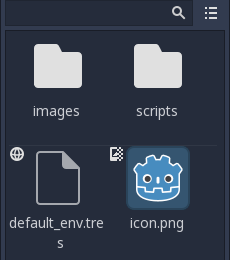
The image above is resource explorer of Godot Engine.
Concrete Structure of Data
Now we get the expectation of data structure, and it’s time to add details so that it can be implemented to programing code. The following image is a data diagram for our software.
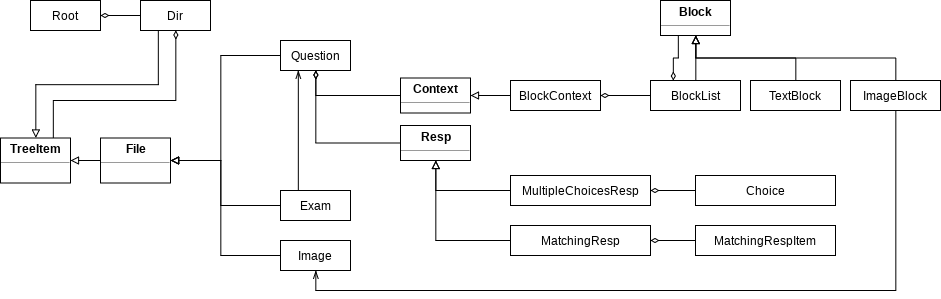
You need to know UML class and object diagram to understand it.
All the rectangles in the diagram represents a class to form data structure. Let’s begin explaining about Root placed at most top left. Root is literally a root data: it will be unique, only-one data constructed when the editor is initialized and destructed when the editor is terminated. It contains every other data which will be used in the editor. It takes one root Dir object as root directory of the entire editor.
Dir, abbreviation of directory, is a type which can take other TreeItem as its children. Dir itself is a subclass of TreeItem as well, and it means a Dir instance can be a child of another Dir instance.
TreeItem is a type which can be contained in Dir. TreeItem subtypes which cannot have other TreeItem instances inherit File, which inherits TreeItem.
There are 3 subclasses of File at this moment, Question, Exam, and Image. Question and Exam are those types introduced previously. There’s one more type, Image. Image takes image data, and this can be referred by other data. Users can import an image file to Image instance. Currently, there’s one class referring this, ImageBlock.
Question takes one Context and one Resp.
Context is an abstract type, and any data classes which is intended to be used as Question’s context can inherit this class and be placed in Question.
BlockContext is subtype of Context. This uses Block’s subclasses to form a question’s context. It has one BlockList as child.
A Block’s instance is expected to hold data which can help to fill a question’s context. This type can be contained to BlockList.
BlockList is list container for Block.
TextBlock takes a string. This represents text part of a question’s context. ImageBlock is used to represent image part. ImageBlock does not take image data by itself, instead, takes reference of Image.
Resp is abbreviation of response. It’s abstract type, just like Context, and any type intended to be used as a question’s response can inherit this and be placed to Question’s child.
MultipleChoicesResp is subtype of Resp, which takes multiple Choice instances in order.
Choice takes text and can be used to represent one of choice for MultipleChoicesResp.
MatchingResp is a response type different from MultipleChoicesResp: it takes 2 lists of MatchingRespItem, instead of one. This is because matching response usually provides 2 columns of items and let exam takers match the corresponding pair.
MatchingRespItem is just like Choice: it takes text and represents an item for MatchingResp. The difference is that MatchingRespItem is intended to be used by MatchingResp, while Choice is intended to be used by MultipleChoicesResp.
GUI Planning
How the data will be shown and the users’ input will be handled should be considered as well. There’s no strict rule or pattern to be followed if your planned GUI is enough to provide convenient data editing environment.
The image below is simple UI planning to be used for our editor.
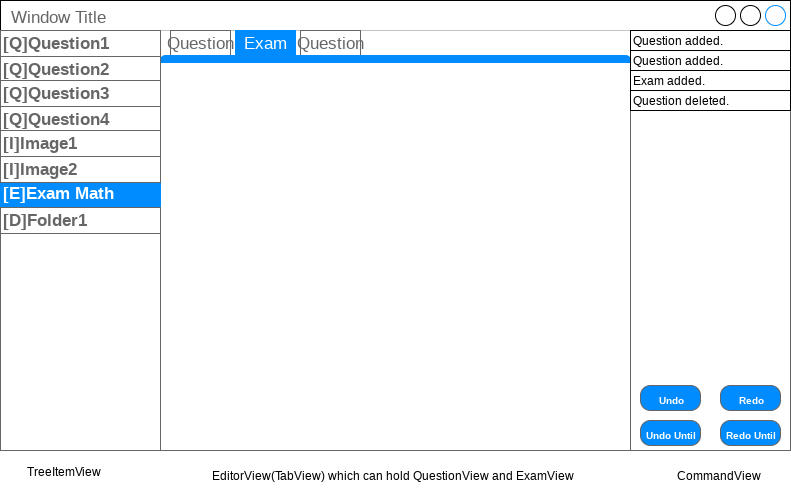
The editor will have main window with 3 widgets placed horizontally, TreeItemView, EditorView, and CommandView.
TreeItemView is a ListView widget which does role of explorer of Dir.
EditorView is a TabView widget which can hold QuestionView and ExamView as its tab.
CommandView is a ListView widget to show command stack for undo/redo feature.