Chapter 5. Base Application Module
In this chapter, we will write base code to make Qt application.
You need to open the source code committed with message
005. Basic Application module before read the extra chapter.
Elements of an Application
We have added data module for our editor, and then what is left to be done? Let’s discover step by step.
First, we need GUI. We don’t want our users have hard time with using text-based environment, but want to provide proper GUI so that data can be understood at a look, and people can edit data with maximizing their equipment such as mouse and tablet.
Imaging the case that undoing, commonly known as Ctrl+Z is not working? An editor has responsibility to keep data safe from users’ mistake such as selecting all data and deleting them, so we need command manager and command pattern implementation for that, what we have done in the previous chapters, except for adding command manager.
We may have some icons or effect sound. If they are placed only in a cold storage (not CPU cache or memory, but in HDD, SSD, Internet, etc), it gives a lot of inefficient result. Having a resource loader, which loads necessary resources to memory when an application starts is a good idea.
At last, assume the case that application objects are communicating each other to propagate events and data. An editor software may have plenty of objects, and they will eventually form a web of dependency, which is really hard to maintain. So here comes a concept called context, an unique object constructed when the application starts and never destructed until the application terminates. It will hold current state of the application and sharing data and propagating events will occur via the context.
Class App
Open app.h.
This App class literally holds everything needed to form our application,
and the main() function just needs to construct it and call exec()
method to launch the application.
App has 5 instances from 5 different classes, Loader, data::Root,
AppCmdManager, Context, and MainWindow. Attention at the order
of the member instances: they are not random, but have its reason.
Resources can be required in any parts of the application are constructed,
especially the GUI part. Root is data module used from Context,
AppCmdManager and GUI part, so it’s placed in the second position.
AppCmdManager does not depends on the Context, while Context
uses AppCmdManager during its lifetime, so Context is followed after
AppCmdManager. The GUI part uses everything, so it’s placed in the end.
Some new programmers may not care about the member variable order, but they need to be cared, since it decides members’ construction and destruction order.
Except for App::exec() method, App does nothing but just takes
those 5 instances. App::exec() initializes these 5 instances and call
QApplication::exec() method to initiate Qt’s main loop.
Class Loader
Open loader.h.
Loader has 2 core functions, load() and unload(). As their names are
saying, load() loads resources from cold storages and unload() simply
free the memory allocated by the resources. My implementation calls
unload() is called when destructor of Loader is invoked, to prevent
potential memory leak. (But my unload() implementation does nothing as well,
because there’s no resources to be freed except for some std::strings)
Methods starts from html_*() will be used to exporting HTML document from
exam data.
Class AppCmdManager
Open app_cmd_manager.h.
Our data command pattern implementation done in Chapter. 4 is not enough to
add Undo/Redo feature. These command instances should be stored in somewhere
to be undone and redone, and AppCmdManager is a container for that.
Its core functions are run(), undo() and redo().
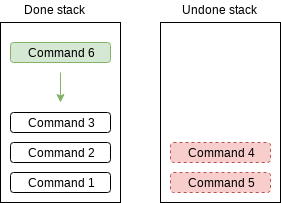
This is how run() works. It clears the undone commands stack, and
put new command to the top of the done commands.
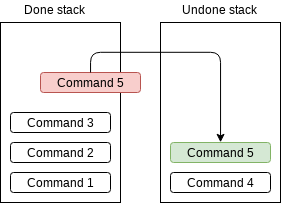
This is how undo() works. It moves a top one of done command stack to
top of undone command stack.
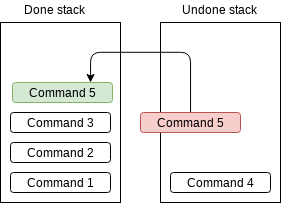
This is how redo() works. It moves a top one of undone command stack to
top of done command stack.
undoUntil() and redoUntil() are different version of undo() and
redo(). Instead of undo or redo just once, these functions try to undo
or redo until a passed command object is undone or redone. If there’s no
matching command object in the stack, they do nothing.
reduce() and setAutoReduceLimit() are introduced to reduce memory
usage when there are too many command instances in the stacks. Usual
editor applications provides such as “undo limit” to prevent Undo/Redo
feature wastes too much memory, and these 2 methods are for that. If
autoReduceLimit() is not 0 and done command stack has more instances than
that, AppCmdmanager pop the oldest instance until the number becomes same
with the limit. This feature will not work when autoReduceLimit() is 0,
in my implementation.
Class Context and ContextHolder
Context is an object shared to subclasses of ContextHolder and let them
access to the current state of the application, such as which file is opened
currently, which items are selected in a dialog, and more. At this moment,
it has nothing inside, and we will keep filling the class with context
variables, which will be introduced in the later chapter.
ContextHolder is a simple helper class. It has init() method which
takes a Context instance, and this can be accessed by context() getter.
This is a class intended to be used for private inheritance, and even if
it’s used for public inheritance, a subclass of ContextHolder should
not be used as ContextHolder. It means, even a class which is not
inheriting ContextHolder, it can be used with Context with
providing same methods with same implementation.